
Wispr Flow
Dictate and edit documents three times faster with AI.
Freemium
-
Quick Info
Launch Date18 Nov '25
PricingFreemium
Wispr Flow – Dictate and edit documents three times faster with AI
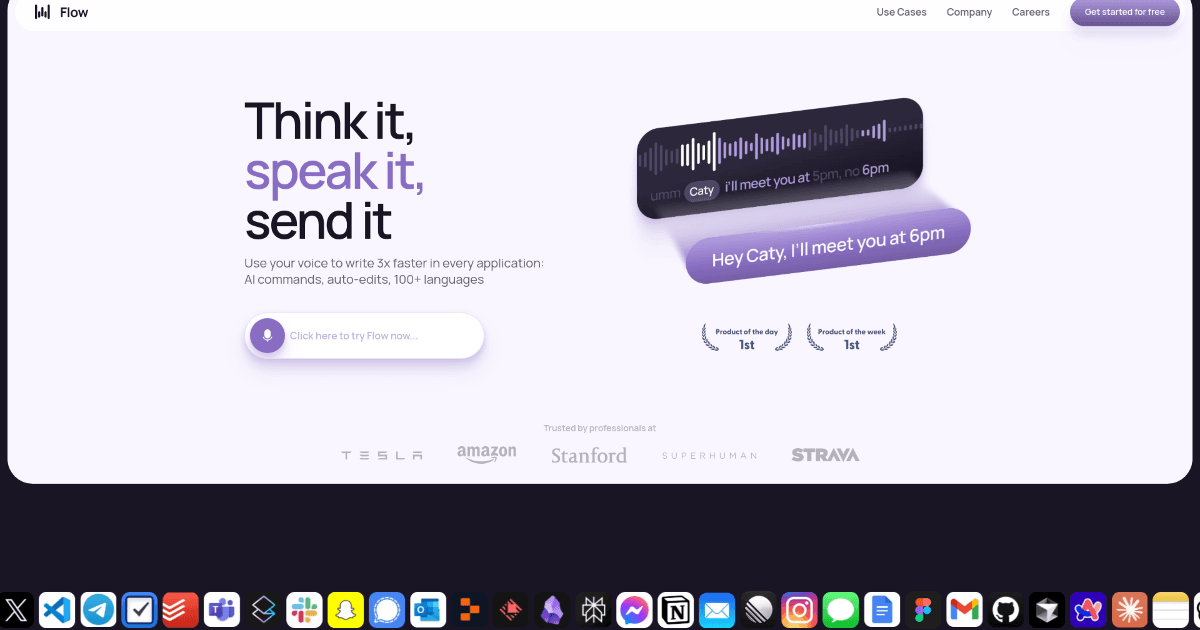
Wispr Flow is a voice dictation tool designed to transform how professionals interact with their computers. By allowing users to type with their voice, it can enhance productivity and efficiency across various applications, from drafting emails to writing code. The tool is part of a growing category of personal assistant solutions that aim to streamline digital workflows.
Tailored for founders, developers, marketers, and other knowledge workers, Wispr Flow offers features like AI commands, auto-editing, and support for over 100 languages. It fits well within collections focused on productivity and work, helping users reduce manual typing and focus on content creation.
What is Wispr Flow?
Wispr Flow is a comprehensive voice dictation solution that enables users to interact with their computer using natural speech. It converts spoken words into text at speeds claimed to be up to three times faster than traditional typing, aiming to minimize physical strain and maximize output.
The tool is designed to be context-aware, adapting its tone and syntax whether you're drafting a formal report or writing code comments. Its core value proposition lies in blending speed with personalization, learning a user's unique voice and style over time. For those exploring AI-powered writing generators, Wispr Flow represents a voice-first approach to content creation.
Key Features
- AI Commands and Auto-Edits: Advanced AI-driven commands facilitate seamless document management and automatic text correction.
- Multi-Language Support: Offers voice typing and command recognition in over 100 languages.
- Context-Aware Voice Typing: Adapts tone and formatting based on the application in use, such as email clients versus code editors.
- Tone Match: Personalizes dictation by learning and mimicking the user's unique vocal patterns and communication style.
- High Accuracy Voice Recognition: Aims to minimize errors and reduce the need for manual post-dictation corrections.
- Broad Application Compatibility: Works across various desktop applications, providing a flexible tool for different tasks.
Use Cases
- Writers and Authors: Drafting manuscripts, articles, and blog posts, then using voice commands for editing and formatting.
- Business Professionals: Composing emails, reports, and presentations hands-free during commutes or multitasking.
- Students: Taking lecture notes, drafting essays, and conducting research by dictating thoughts and summaries.
- Software Developers: Writing code comments, documentation, and commit messages using voice to reduce context switching.
- Accessibility Support: Assisting individuals with mobility impairments or repetitive strain injuries to interact with computers more easily.
- Language Learners: Practicing pronunciation and fluency by dictating in a target language and reviewing the transcribed text.
Underlying AI Models or Technology
Wispr Flow leverages advanced speech recognition technology to convert spoken audio into accurate text. This core capability falls under the domain of speech AI, which involves processing and understanding human vocal inputs.
Beyond basic transcription, the tool employs natural language processing (NLP) models to enable its AI commands and context-aware features. These models help interpret user intent, apply appropriate formatting, and perform auto-edits, making the dictation process more intelligent and responsive than simple voice-to-text conversion.
Pricing
Wispr Flow operates on a freemium model with tiered subscriptions:
- Flow Basic: Free. Includes 2,000 words per week, fast voice typing, and support for 100+ languages.
- Flow Pro: $15 per month. Offers unlimited words, command mode for editing, and personalized writing style learning.
- Flow Enterprise: $24 per user per month. Features team-wide shared context, SSO/SAML support, and VIP support.
Pricing and plan details are subject to change. For the most current information, please refer to the official Wispr Flow website.
Pros and Cons
Pros
- Significant time savings for document creation and editing compared to manual typing.
- High accuracy in voice recognition reduces post-dictation correction effort.
- Personalization through tone matching helps maintain a consistent voice across documents.
- Extensive language support makes it accessible to a global, multilingual user base.
Cons
- New users may experience a learning curve to master the advanced voice commands and AI features.
- The free tier's 2,000-word weekly limit may be insufficient for power users or professionals with high-volume dictation needs.
- Effectiveness can depend on audio quality and a user's speaking environment, which may limit consistency.
Alternatives
For users seeking different approaches to voice dictation or AI-assisted writing, several alternatives exist. Many are part of broader content and writing tool collections.
- Built-in OS Dictation: Free voice-to-text tools integrated into operating systems like Windows, macOS, and iOS, though often with fewer AI-powered features.
- Dragon Professional: A long-established, premium dictation software known for high accuracy and deep customization, typically at a higher price point.
- Otter.ai: Focuses on real-time transcription for meetings and conversations, with strong collaboration features.
- Descript: Combines transcription with advanced audio and video editing, suited for media creators and podcasters.
- Google Docs Voice Typing: A free, web-based dictation tool integrated into Google Docs, offering basic functionality without advanced AI commands.
Frequently Asked Questions
Embed This Tool
Add this badge to your website to show that Wispr Flow is featured on AIPortalX.

Featured on AIPortalXWispr Flow
to leave a comment