
Video Candy
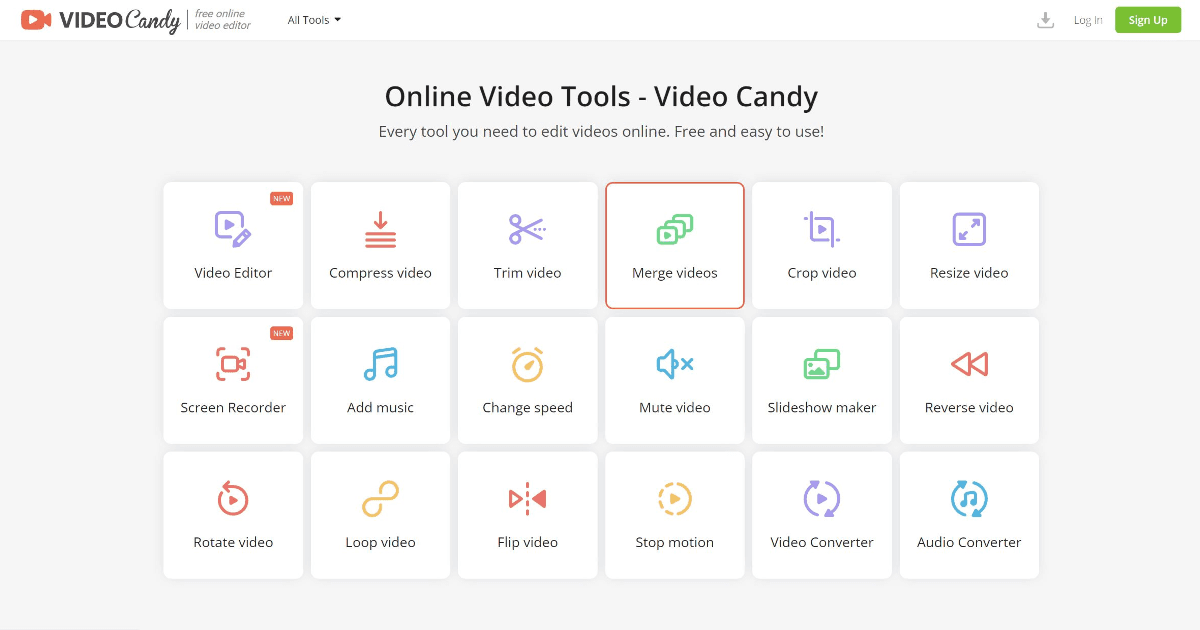
Every tool you need to edit videos online. Free and easy to use!
Freemium
-
Quick Info
Launch Date5 Dec '25
PricingFreemium
Categories
Video Candy – Comprehensive online video editing made simple and accessible
Video Candy is a versatile online platform that provides a full suite of tools for editing, enhancing, and converting videos directly in your web browser. Designed for ease of use, it caters to a broad audience from individual creators to professional teams looking for a streamlined workflow without complex software installations. Its freemium model makes core features accessible to everyone, while premium plans unlock advanced capabilities for more demanding projects.
As part of the broader ecosystem of video editing solutions, Video Candy stands out by combining a wide array of utilities into a single, cohesive interface.
What is Video Candy?
Video Candy is a comprehensive, browser-based video editing suite that offers over 40 specialized tools for manipulating media files. It eliminates the need for desktop software by providing functionalities like trimming, merging, compressing, and converting videos entirely online. The platform is built to be intuitive, allowing users to achieve professional-looking results quickly, regardless of their prior editing experience.
Its design philosophy centers on accessibility and efficiency, making it a strong contender in the video and audio media toolspace. By leveraging cloud processing, users can handle files up to 4GB and work from any device with an internet connection.
Key Features
Video Candy's extensive feature set is designed to cover the majority of common video editing needs in one place.
Comprehensive Editor: A user-friendly interface for basic cuts, trims, and merges.
Screen Recorder: Built-in tool to capture screen activity for tutorials or presentations.
Audio Tools: Capabilities to add background music, adjust speed, or mute audio tracks.
File Conversion: Supports conversion between numerous video and audio formats.
Compression & Resizing: Reduces file size for sharing or optimizes dimensions for different platforms.
No Watermark on Paid Plans: Export clean, professional videos without branding.
Use Cases
Content Creators: Quickly editing and optimizing videos for YouTube, TikTok, and Instagram.
Marketing Teams: Producing promotional clips, social media ads, and product demos.
Educators & Trainers: Creating instructional screen recordings and lecture materials.
Small Businesses: Developing affordable video content for websites and customer engagement.
Personal Projects: Editing vacation videos, family clips, or hobbyist content without professional software.
Underlying AI Models or Technology
While Video Candy is primarily a utility-focused editing platform, it incorporates AI and machine learning techniques to enhance specific functionalities. These likely include intelligent compression algorithms that reduce file size while preserving quality, and possibly automated editing suggestions. The platform's efficiency in processing various formats and delivering high-quality outputs points to optimized, algorithm-driven backend systems.
Its core technology aligns with advancements in the video domain, where AI is increasingly used for analysis and enhancement. For users interested in the generative side of media creation, exploring specialized video generation models can provide complementary capabilities.
Pricing
Video Candy operates on a freemium model. A free tier provides access to basic editing tools with some limitations, such as watermarks on exports. Paid subscriptions remove these restrictions and add premium features.
Reported plans include a yearly subscription at a discounted rate, a monthly option, and a one-time lifetime access purchase. Specific pricing and features are subject to change, so visiting the official Video Candy website is recommended for the most current details.
Pros and Cons
Pros
All-in-One Suite: Over 40 specialized tools eliminate the need for multiple separate applications.
Browser-Based & Accessible: No downloads required; works across operating systems from any device.
High-Quality Output: Maintains video fidelity during compression and conversion processes.
Generous Free Tier: Allows users to test core functionalities before committing to a paid plan.
Cons
Feature Limitations on Free Plan: Exports include a watermark, and some advanced tools are locked.
Processing Time Limits: Even with priority processing on paid plans, there may be caps on job duration.
Learning Curve for New Users: The sheer number of tools, while comprehensive, can be initially overwhelming.
Alternatives
Several other platforms offer online video editing, each with different strengths. For professionals focused on marketing and sales workflows, integrated solutions with CRM or social media publishing might be preferable.
Kapwing: A popular collaborative online editor with strong meme and social media template features.
Clipchamp: Often integrated into operating systems, offering a balance of simplicity and core editing tools.
Canva: While primarily a design platform, its video editing capabilities are robust and tightly integrated with its graphic design tools.
Adobe Express: A streamlined, online version of Adobe's creative tools, suitable for quick edits and content creation.
Frequently Asked Questions
Embed This Tool
Add this badge to your website to show that Video Candy is featured on AIPortalX.

Featured on AIPortalXVideo Candy
to leave a comment