
Integrity
Organize projects with integrated notes, canvases, AI chats.
Contact for Pricing
-
Quick Info
Launch Date30 Sep '25
PricingContact for Pricing
Collections
Categories
Integrity – Organize projects with integrated notes, canvases, and AI chats
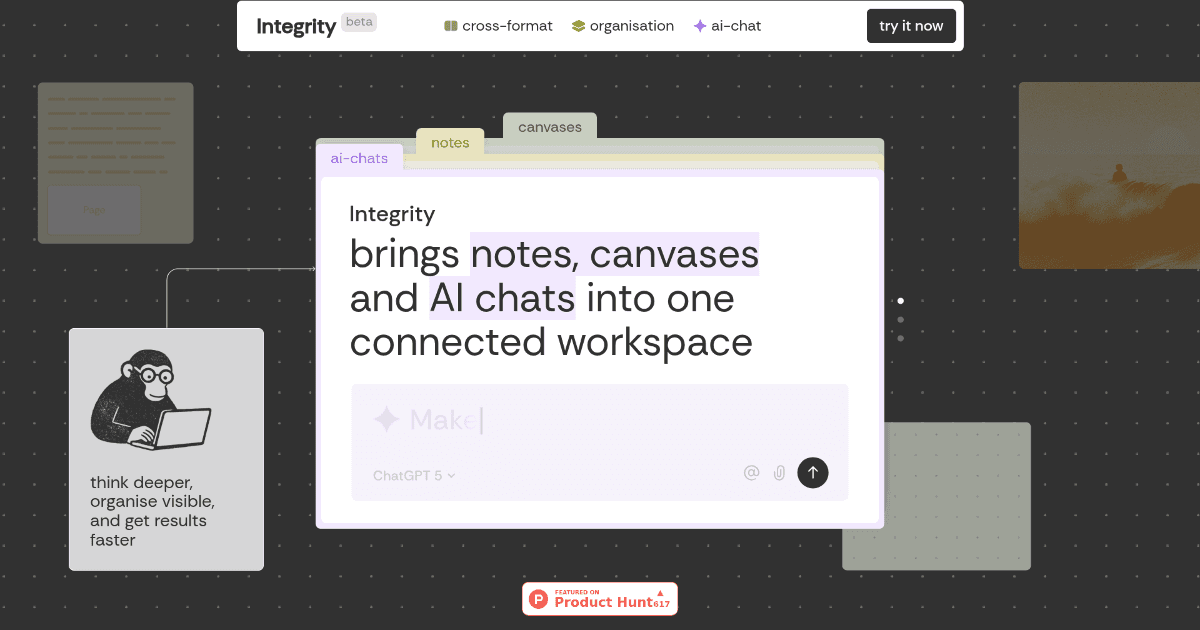
Integrity is a unified workspace designed for professionals who need to manage complex projects. It combines notes, canvases, and AI-powered conversations into a single, fluid environment, allowing ideas to move seamlessly between different formats. This approach helps founders, developers, and creative teams think deeper and execute faster by reducing the friction of switching between disparate productivity tools.
The platform is built around a central project tree that keeps all work visible and accessible, promoting clarity and minimizing oversight. By integrating multiple AI models directly into the workflow, Integrity aims to be more than a note-taking app—it's a connected hub for strategy, ideation, and collaboration.
What is Integrity?
Integrity is an AI-enhanced workspace that reimagines project organization. It eliminates the need to juggle separate applications for notes, whiteboards, and AI assistants by bringing them all into one interconnected environment. Every element—text, images, tables, tasks, and AI chats—exists as a universal block that can be freely moved and connected across the workspace.
This design philosophy centers on a single, navigable project tree from which all notes, canvases, and conversations branch. The sidebar provides transparency, showing a live preview of any page or canvas without needing to open it. This makes Integrity particularly suited for complex project management and strategic planning where visibility across all moving parts is critical.
Key Features
- Universal Blocks: All content types (text, images, tables, AI chats) exist as draggable blocks that can be placed on any surface.
- Unified Project Tree: Notes, canvases, and chats all grow from a single, visual hierarchy, keeping the entire project structure clear.
- Sidebar Transparency: View live previews of any page or canvas directly in the sidebar without opening new tabs.
- Multi-Model AI Conversations: Choose between AI models like ChatGPT, Claude, and Gemini within a single chat thread and switch between them without losing context.
- Context-Aware AI: AI chats can inherit the full context of your workspace, making discussions more relevant and productive.
- Integrated Task Manager: A unified view of all tasks associated with notes and canvases, helping to track progress.
Use Cases
- Founders mapping business strategy and long-term roadmaps.
- Project managers building detailed project plans and tracking milestones.
- Researchers connecting disparate ideas, data points, and literature notes.
- Creative professionals developing visual projects, storyboards, and design concepts.
- Educators designing interactive lesson plans and course materials.
- Freelance consultants managing deliverables and communications for multiple clients.
Underlying AI Models or Technology
Integrity integrates multiple state-of-the-art large language models (LLMs) to power its conversational AI features. Users can select from models like OpenAI's ChatGPT, Anthropic's Claude, and Google's Gemini within the same chat interface. This multi-model approach allows teams to leverage the specific strengths of different language models for varied tasks, from creative brainstorming to analytical reasoning.
The platform's core innovation lies in its context-awareness. The AI doesn't operate in a vacuum; it can access and reference the content of the entire workspace—notes, canvases, and tasks—to provide highly relevant assistance. This turns the AI from a generic chatbot into a specialized project collaborator with deep understanding of the work at hand.
Pricing
Integrity is currently in an open beta phase, and a concrete public pricing structure has not been announced. Access during the beta period is typically offered under a freemium or early-access model. For the most accurate and current information regarding pricing, plans, and potential future subscription tiers, please refer to the official Integrity website.
Pros and Cons
Pros
- Deep Integration: Seamlessly combines notes, canvases, tasks, and AI chats into one workspace, eliminating app-switching.
- Exceptional Visibility: The unified project tree and sidebar transparency keep all project elements in clear view.
- Flexible AI: The ability to switch between multiple leading AI models in a single conversation is a powerful and unique feature.
- Context-Aware Collaboration: AI chats that understand the full workspace context lead to more productive and relevant assistance.
Cons
- Learning Curve: The density of features and novel interface can be overwhelming for new users seeking a simple note-taking tool.
- Beta Limitations: As a platform in active development, some features may be unpolished or subject to change.
- Ecosystem Integration: While powerful on its own, integrations with external tools like Notion or Miro are areas for future expansion.
Alternatives
For teams considering different approaches to project organization and AI-assisted work, several alternatives exist. These range from traditional note-taking apps with AI add-ons to more specialized AI automation platforms.
- Notion: A highly flexible workspace for notes, databases, and wikis, often augmented with AI features for writing and summarization.
- Miro: A leading digital whiteboard for visual collaboration, brainstorming, and diagramming, with some AI-powered template generation.
- Obsidian: A powerful, local-first note-taking application focused on linking ideas, with a plugin ecosystem that can add AI capabilities.
- Mem: An AI-powered workspace that automatically organizes notes and surfaces relevant information using AI.
- Coda: A doc-based platform that blends documents, spreadsheets, and apps, offering AI features for content generation and analysis.
Frequently Asked Questions
Embed This Tool
Add this badge to your website to show that Integrity is featured on AIPortalX.
Featured on AIPortalXIntegrity
to leave a comment